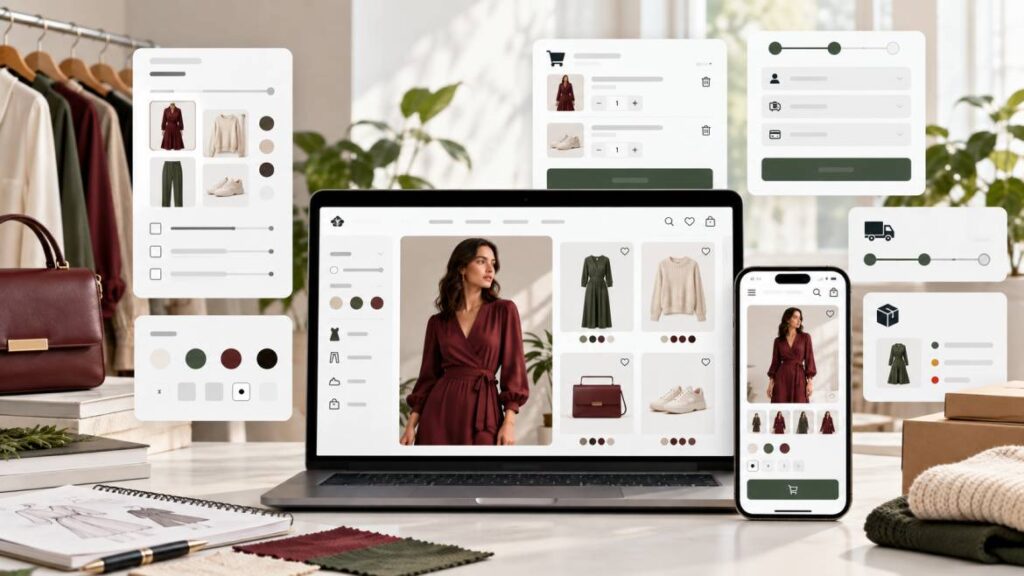
Fashion ecommerce website features should make it easy for customers to browse products, understand sizes and colours, trust what they are buying, place an order, and know what happens after payment.Before you hire a developer, you should be clear about your products, product photos, size options, delivery rules, payment method, stock management, and how you want orders to be handled.
You do not need every advanced feature on day one. A good launch website should cover the parts that affect buying confidence and order flow first. Extra features like loyalty points, complex automation, advanced dashboards, and custom mobile app features can come later when the store has real customer behaviour to learn from.
Fashion Ecommerce Website Features to Prioritise First
A fashion website is not just a place to display clothes. Customers need to make small decisions before they buy: size, colour, fit, fabric, delivery location, return rules, and whether the item will look the same as the photo.
That means a fashion ecommerce website needs more than a homepage and a contact form. It needs a product structure that helps shoppers choose correctly and helps the business owner manage orders without confusion.
Before speaking with a developer, write down how your store works offline. Do you sell ready-to-wear pieces, made-to-order outfits, thrift items, shoes, bags, or accessories? Do you sell one-of-one items, or do you restock the same product in different sizes? Do customers pay before delivery, pay on delivery, or request confirmation on WhatsApp?
Those answers matter because the right website setup depends on how the business actually sells.
The Essential Launch Features
At launch, your website should focus on the features that help a customer move from interest to order without needing too much explanation.
1. A Clear Homepage That Shows What You Sell
Your homepage should quickly show the type of fashion products you sell. A visitor should not have to guess whether your store sells corporate wear, streetwear, modest fashion, luxury outfits, shoes, bags, or ready-to-wear dresses.
The homepage should include:
- A strong hero section with a clear product direction
- Featured categories
- New arrivals or best sellers
- A simple path to the shop page
- Trust signals such as delivery areas, payment options, or customer support details
Do not let the homepage become only a pretty banner. Beauty helps, but customers still need a clear shopping path.
2. Product Categories That Match How Customers Shop
Good categories make browsing easier. A fashion store may need categories such as dresses, tops, trousers, two-piece sets, bags, shoes, office wear, casual wear, or modest wear.
The mistake many store owners make is creating categories from the owner’s point of view instead of the customer’s point of view. If your customers commonly ask for “office gowns”, “Sunday outfits”, “two-piece sets”, or “baggy pants”, those words may be more useful than internal labels that only you understand.
Keep the category structure simple at launch. Too many empty categories can make the store look unfinished.
3. Product Pages With the Information Buyers Need
The product page is where many buying decisions happen. A weak product page can make customers abandon the store and return to Instagram or WhatsApp to ask basic questions.
Each product page should include:
- Product name
- Price
- Clear product images
- Available sizes
- Available colours
- Fabric or material information where relevant
- Fit notes, such as loose fit, slim fit, stretchy, or true to size
- Delivery or pickup information
- Return or exchange guidance
- Add to cart or enquiry button, depending on your sales flow
For fashion products, images are not decoration. They are part of the sales process. WooCommerce supports product images and product galleries, including a main product image, catalog images, and thumbnails used across the shop and cart. WooCommerce recommends uploading images of at least 800 x 800 pixels so products display clearly in different parts of the store.
Source: WooCommerce product images and galleries documentation
4. Size and Colour Options
If you sell products in different sizes or colours, your website should not force you to create messy duplicate products for every option.
WooCommerce can handle variable products, which means one product can have different variations such as size, colour, or fabric. Each variation can have its own price, stock quantity, SKU, and image where needed.
Source: WooCommerce variable product documentation
This matters for fashion stores because a black dress in size 10 and the same black dress in size 14 may need separate stock tracking. A red version may also need a different product image. If this is not planned properly, customers may order items that are not actually available.
Before hiring a developer, list the real options you sell. For example:
- Sizes: S, M, L, XL
- Colours: black, white, red, brown
- Length: short, midi, long
- Fit: regular, oversized
Do not add options just because they look professional. Add the options you can actually fulfil.
5. Product Search and Filters
Fashion customers often browse by mood, budget, size, colour, occasion, or category. A good store should help them narrow choices quickly.
Useful filters can include:
- Category
- Price range
- Size
- Colour
- Availability
- Product type
Filters are especially useful when the store has many products. If you only have 15 products at launch, keep filtering simple. If you have 100 products, filters become more important.
Search should also be tested with the words customers naturally use. If shoppers search “black bag”, “office dress”, or “wedding guest outfit”, your product names and descriptions should support those searches.
6. Mobile Shopping Experience
Most small fashion businesses get traffic from Instagram, TikTok, WhatsApp, and Facebook. That means many customers will open the website on a phone.
Your developer should test the website on mobile, not only on a laptop. On mobile, the product grid, menu, filters, cart, checkout form, images, and buttons must be easy to use.
Pay attention to:
- Button size
- Sticky header behaviour
- Cart drawer behaviour
- Product image loading
- Filter panel usability
- Checkout fields
- WhatsApp or contact buttons
A store can look beautiful on desktop and still lose customers on mobile if the cart or checkout feels stressful.
7. Cart and Checkout That Match Your Business
Every fashion store does not need the same checkout flow.
Some stores need full online payment. Some need payment on delivery. Some need bank transfer with manual confirmation. Some want customers to add products to cart and then complete the order through WhatsApp.
The important thing is to choose one clear flow at launch.
Your checkout should answer:
- What customer details are required?
- Is account creation optional or required?
- Which payment methods are accepted?
- Which delivery areas are supported?
- Is pickup available?
- What happens after the customer places an order?
- Does the customer receive an email or WhatsApp confirmation?
If customers are unsure what happens after checkout, trust drops.
8. Delivery, Pickup, and Return Information
Fashion customers care about delivery time, delivery cost, pickup options, and exchange rules. Do not hide this information until the final checkout step.
Your website should clearly explain:
- Delivery locations
- Delivery fees or fee ranges
- Pickup availability
- Processing time
- Same-day or next-day delivery rules
- Return or exchange policy
- What happens if a size does not fit
WooCommerce supports shipping zones and shipping methods, but the correct setup depends on how the business delivers. A local boutique may need simple city-based delivery. A larger store may need different rules for local delivery, nationwide delivery, free shipping thresholds, or pickup.
9. Stock Management
Stock management is one of the biggest reasons fashion stores need careful setup.
If you sell limited items, the website should not keep accepting orders for sold-out products. If you restock often, you may want products to stay visible but clearly marked as out of stock. If you sell variations, each size and colour may need separate stock quantity.
WooCommerce includes inventory settings that allow store owners to enable stock management, set low-stock and out-of-stock notifications, hide out-of-stock products, and decide how stock quantities are displayed.
Source: WooCommerce product inventory settings documentation
Before development starts, decide how stock should work:
- Should sold-out products disappear or remain visible?
- Should customers be allowed to backorder?
- Should each size have its own stock count?
- Who will update stock after offline sales?
- Should low-stock emails go to the store owner?
This is not just a technical setting. It affects customer trust.
10. Order Management for the Store Owner
A fashion ecommerce website should not only look good to customers. It should also be manageable for the owner.
After launch, someone must:
- Add new products
- Update prices
- Change product images
- Update stock
- View orders
- Change order status
- Respond to failed or abandoned orders
- Check customer enquiries
If the backend is confusing, the store owner may stop using the website and return to manual posting only. Ask your developer how you will manage products and orders after launch.
Features That Are Useful But Can Wait
Not every feature must be built immediately. Adding too much too early can increase cost, slow down the website, and make the admin area harder to manage.
Features that can often wait include:
- Loyalty points
- Referral rewards
- Advanced analytics dashboard
- Customer wallet system
- Multi-vendor marketplace
- Mobile app
- Complex automation
- AI recommendations
- Wholesale portal
- Subscription styling service
These can be powerful later, but they should come after the basic store is working and customers are already using it. Fashion ecommerce website features
What You Should Prepare Before Hiring a Developer
To save time and avoid confusion, prepare these before development starts:
- Brand name and logo
- Product categories
- Product photos
- Product names and prices
- Sizes, colours, and variations
- Delivery rules
- Payment methods
- Return or exchange policy
- About page information
- Contact details
- Social media links
- Example websites you like
- List of must-have features
- List of features that can wait
You do not need to have everything perfect, but the more organised your information is, the easier it is for a developer to build the right store.
Questions to Ask a Developer Before You Pay
Before paying for a fashion ecommerce website, ask practical questions:
- Will I be able to add and edit products myself?
- Can each size and colour have separate stock?
- Will the website work well on mobile?
- Can customers filter products by category, price, size, or colour?
- What payment and delivery methods will be set up?
- What happens after a customer places an order?
- Will you test the cart and checkout before launch?
- Will you help me understand how to manage orders?
- What is included after launch?
- What will cost extra later?
The goal is not to interrogate the developer. The goal is to make sure both sides understand what the store must do.
A Simple Launch Checklist
Use this checklist before launching:
- Homepage explains what the store sells
- Shop page is easy to browse
- Categories are clear
- Product photos are sharp
- Product descriptions answer buyer questions
- Sizes and colours are set correctly
- Stock works correctly
- Cart works on mobile and desktop
- Checkout has been tested
- Payment or order-confirmation method works
- Delivery information is visible
- Return or exchange policy is clear
- Contact details are easy to find
- Store owner knows how to add products and manage orders
If these basics are not ready, advanced features will not fix the store.
Final Thoughts
A good fashion ecommerce website should support how your business sells, not just copy what another store is doing. Start with the buying journey: what customers need to see, choose, trust, and complete before placing an order.
Once those essentials are clear, a developer can build a store that is easier to shop from and easier to manage.
If you are planning a fashion ecommerce website and want a store built around real product browsing, mobile shopping, checkout, stock, and order management, my WooCommerce store development service is a good place to start.